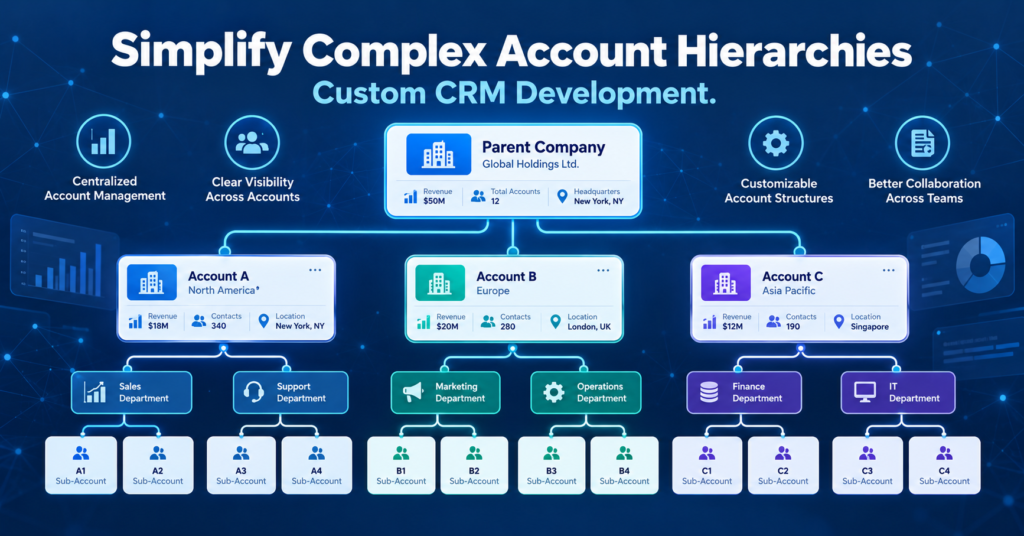
A client with a holding company, four subsidiaries, and a dozen regional offices does not fit into one “Account” tab. Most sales teams try to force it there anyway. The result: fragmented history, duplicate outreach, and a leadership team that can’t answer a simple question — how much revenue sits with this client across every division? That structural gap is exactly what custom CRM software development services exist to close, and the fix starts with understanding why hierarchy modeling breaks down in the first place.
The Hidden Cost of Flat CRM Structures in Enterprise Accounts
Most CRM platforms ship with a flat account model. One company, one record. Works fine for a local retailer. It falls apart the moment a distributor manages a client with twelve regional branches placing separate orders under one master agreement.
A rep in the Midwest logs a support ticket against “Branch 7.” The national account director logs a renewal call against the parent company, typed slightly differently. Two records now exist for the same relationship, and neither shows the other’s activity. Pricing exceptions, contract terms, support history — all scattered across records nobody cross-references.
Generic CRM software for B2B companies was built for transactional selling, not layered account governance, and that mismatch shows up fastest at renewal time. A branch churns quietly. Nobody notices until the invoice ledger flags it weeks later — not the CRM.
Symptoms worth watching for:
- Duplicate account and contact records for one legal entity
- Opportunities and tickets orphaned from the parent relationship
- No consolidated view of total contract value across subsidiaries
These aren’t data-entry mistakes. They’re architecture failures. A flat object model cannot represent a client that’s legally one entity but operationally a dozen.
Why Parent-Child Hierarchies Break Standard CRM Platforms
Enterprise clients form a tree, not a point. Holding company at the top, subsidiaries beneath it, plant-level or departmental purchasing units beneath those. Standard platforms offer a “parent account” field. It looks like hierarchy support. It isn’t — the field links two records visually without enforcing any behavior a real hierarchy requires.
Take a manufacturing client: one holding company, three subsidiaries, five plant-level purchasing teams each negotiating separate supply terms. A rep working Subsidiary B needs visibility into master contract terms set at the holding-company level. That same rep should not see Subsidiary C’s confidential pricing. Out of the box, most platforms can’t enforce that line. So teams duplicate records per subsidiary, or grant blanket access and hope nobody leaks a number they shouldn’t.
Custom CRM development closes that gap. A properly engineered hierarchy object lets deal value, tickets, and contract terms roll up automatically while access stays scoped to the correct branch. Rules inherit downward — a master discount applies to every subsidiary — without spilling sideways across siblings who shouldn’t see each other’s terms.
This isn’t a configuration toggle. It’s data modeling work: deciding what rolls up, what stays isolated, how exceptions override inherited rules. Vendor defaults rarely solve this on their own. It’s the core engineering problem custom CRM software development services get hired for.
Role-Based Visibility Across Subsidiaries and Decision-Makers
Hierarchy without permission control just creates a bigger mess with better labels. Who sees what — that’s where the risk gets personal.
A regional account manager at a packaging supplier once stumbled onto pricing negotiated by the national account director for that same parent company. Quoted 15% higher than what headquarters had already locked in. The client noticed immediately. Internal trust between the two reps took months to rebuild, and procurement used the inconsistency as leverage in the next negotiation round.
That scenario repeats constantly in enterprise selling. CRM software for B2B companies needs row-level and field-level permissioning tied to the account hierarchy itself — not just generic sales territories that ignore how the client’s own org chart actually works. A rep assigned to Subsidiary A sees Subsidiary A’s contacts, deals, and notes. Nothing from Subsidiary B unless someone explicitly grants it.
What matters most here:
- Hierarchy-aware ownership, so visibility follows the account tree
- Field-level restrictions on pricing and terms within shared accounts
- Audit trails showing who viewed or edited cross-subsidiary data
Getting this right through custom CRM development means mapping the client’s actual reporting structure into the permission model rather than bolting roles on afterward. Skip that step and the CRM turns into a liability instead of a safeguard.
Data Rollups, Forecasting, and Revenue Attribution Across Hierarchies
Ask a sales VP for total exposure with a top enterprise client. Watch how long it takes to get an answer. If pipeline value sits in six disconnected opportunity records across subsidiaries, the honest answer is “we don’t know yet.”
That delay isn’t a reporting inconvenience — it’s a forecasting blind spot. Renewal risk at one subsidiary often signals trouble brewing at the parent level, but only if the CRM rolls activity upward automatically. Without that, a churn warning at Branch 3 stays invisible to whoever’s managing Branch 1’s renewal three weeks later.
Hierarchy-aware custom CRM software development services solve this with calculated rollup fields: aggregate deal value, weighted pipeline, support ticket volume, summed at every level of the tree. Build a dashboard on top of that structure and account health shows at the parent level while reps still drill into subsidiary-level detail when they need it. Finance stops manually stitching spreadsheets together at quarter close.
The forecasting conversation changes too. Leadership stops asking “what’s the number for this client” and starts asking “which subsidiary is driving the risk.” A sharper question. It only works when the underlying data architecture supports it.
Keeping the Hierarchy in Sync With ERP, Billing, and Support Systems
A hierarchy that only lives in the CRM is half a solution. Billing systems, ERP platforms, support desks — each maintains its own version of “who belongs to whom,” and those versions drift apart constantly.
Say a subsidiary gets renamed after an acquisition. The CRM updates within a week; sales noticed right away. The ERP’s billing hierarchy doesn’t update for four months, because finance only touches that record at invoice time. During that gap, invoices go out under the old entity name. Tickets route to the wrong team. The sales rep has no visibility into unpaid balances sitting under a name that no longer matches their CRM record.
Avoiding that drift takes integration work, not just CRM configuration. Custom CRM software development services typically include middleware or API-level sync between the CRM’s account hierarchy and the systems of record in finance and support. Arobit, among other CRM development firms working this space, has treated cross-system hierarchy sync as a core engineering requirement rather than an add-on — which tracks with how integration-heavy this problem actually is.
Three integration points carry the most weight: entity-ID mapping between systems, scheduled reconciliation jobs that flag mismatches, and a single source of truth other systems subscribe to instead of duplicating independently.
A Partner Worth Studying: Arobit’s Approach to Hierarchy-Driven CRM
Vendors who treat account hierarchies as an afterthought tend to ship rigid, template-based instances that break the first time a client’s org chart changes. Arobit’s work in ERP and CRM development starts from a different place — hierarchy, permissioning, and cross-system sync treated as foundational architecture, not configuration layered on after launch.
For B2B teams managing enterprise clients with multiple subsidiaries, that distinction decides whether the CRM becomes a durable system of record or another spreadsheet substitute within eighteen months. Anyone evaluating a development partner for this kind of project should look closely at how the vendor handles data modeling, role-based access, and ERP integration before signing off on a build.
FAQs
- What makes account hierarchy modeling different from standard CRM account management?
Standard accounts treat each client as one flat record. Hierarchy modeling represents a client as a tree of related entities, with rollups and permission inheritance built in, so parent-level and subsidiary-level data stay connected without duplicate records.
- Can an existing CRM be retrofitted to handle complex account hierarchies?
Sometimes — it depends on the platform’s underlying data model. Platforms with flexible object relationships can often support hierarchy fields through custom development. Rigid, template-based platforms usually need a more invasive rebuild to get rollups and scoped permissions right.
- How long does it take to build hierarchy-aware CRM architecture?
Depends on how many hierarchy levels and integration points are involved. A single-layer parent-child structure with basic rollups might take a few weeks. Multi-level hierarchies with ERP and billing sync usually run several months, given the data mapping involved.
- What’s the biggest mistake companies make designing account hierarchies in CRM?
Treating hierarchy as a visual nice-to-have instead of a permission and data-integrity requirement. Teams add a “parent account” field without defining rollup rules or access boundaries — which just recreates the fragmentation problem the hierarchy was supposed to fix.