Custom dispensary product cards
In the high-stakes environment of a modern dispensary, shelf space is the most valuable real estate you own. Your customers are walking through your aisles, scanning hundreds of products, and looking for a reason to choose one over the other. If your shelves are cluttered with handwritten notes, messy tape, or—worse—no information at all, you are leaving money on the table.
To truly stand out, you need more than just inventory on a shelf; you need a strategy. This is where custom dispensary product cards (often referred to as shelf talkers) become the most effective tool in your retail arsenal. They act as your silent salesmen, working 24/7 to educate customers, build trust, and drive purchasing decisions.
Beyond the Price Tag: The Power of Information
Why do customers struggle to make a choice? Usually, it is a lack of information. They see a jar, but they don’t see the terpene profile. They see a price, but they don’t know if the strain is Sativa, Indica, or Hybrid.
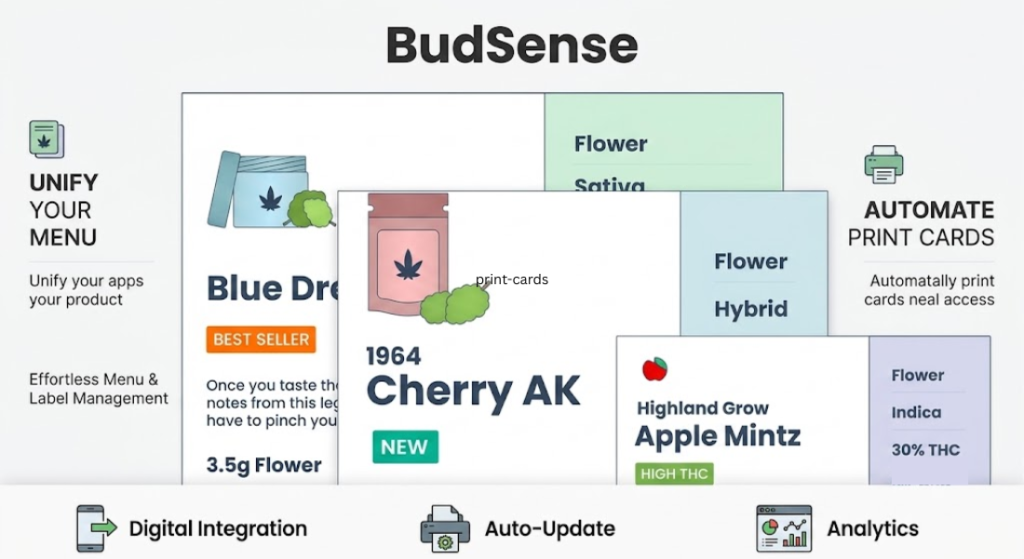
When you use custom dispensary product cards, you provide the customer with the critical details they need to make an informed choice. This is about more than just listing the THC percentage. High-quality product cards allow you to display:
-
Terpene Profiles: Helping the “canna-curious” and connoisseurs alike find the right effects.
-
Product Badges: Highlighting “Staff Picks,” “Top Sellers,” or “New Arrivals.”
-
Regulatory Data: Ensuring lab results and compliance information are clear and legible.
By providing this data at the point of decision, you reduce the “menu anxiety” that often slows down transactions and overwhelms customers.
The Problem with Manual Merchandising
Many dispensaries still rely on manual processes to create these cards. An employee spends hours in graphic design software or spreadsheets, printing, cutting, and placing cards manually. The moment a new shipment arrives, that hard work is outdated. The old cards get left up, creating confusion and frustration.
The evolution of retail technology has changed this. Now, you can use automated systems that integrate directly with your Point of Sale (POS) software. When your inventory updates in the back office, your print-ready product cards update automatically. This ensures your shelves are always accurate, professional, and visually consistent.
Visual Consistency as a Brand Builder
Consistency is the hallmark of a premium retail experience. Imagine walking into a high-end department store—everything is perfectly labeled, with uniform fonts and branding. That level of attention to detail builds psychological trust.
When your custom dispensary product cards use your store’s unique color palette, logo, and brand typography, it elevates the entire atmosphere of your shop. It moves your store from a “warehouse-style” environment to a professional, branded retail destination. For MSOs and expanding retailers, this consistency is vital to ensuring that no matter which location a customer visits, the “vibe” and level of service remain identical.
Increasing Basket Size Through Cross-Selling
Product cards are one of the best tools for merchandising. Because they are placed right next to the product, they are the last thing a customer sees before picking up an item.
You can use these cards to suggest pairings. For example, a card under a specific concentrate could read, “Pairs perfectly with [Brand Name] vaporizers.” By using your shelf space to suggest complementary products, you encourage customers to explore more of your inventory, which naturally leads to higher average basket sizes.
The Human Element: Why Automation Matters
It may seem counterintuitive that using “automated” cards creates a more “human” experience, but it’s true. When your staff isn’t spending three hours a week fighting with a printer and a pair of scissors, they have more time to talk to customers.
The goal of automation is to handle the rote, repetitive tasks so that your employees can focus on the human side of the business—sharing their passion for cannabis, listening to customer needs, and providing genuine guidance.
Conclusion: Elevate Your Shelves with BudSense
Your shelf space is a massive opportunity that is likely underperforming if you are still using outdated merchandising tactics. By upgrading to professional, automated signage, you turn your aisles into a curated, informative, and persuasive shopping journey.
If you are ready to modernize your retail footprint, BudSense is here to help. Our platform offers the most seamless way to create custom dispensary product cards that stay perfectly in sync with your live inventory. With BudSense, you get a solution that handles the heavy lifting of design and data, allowing you to focus on what you do best: running a successful, customer-focused dispensary. Stop letting your shelves be messy—let them be the most effective salesperson on your floor.
Frequently Asked Questions
1. How do automated product cards sync with my inventory?
Our software integrates directly with your POS system. As soon as you update a price, a product description, or inventory level in your POS, the data is pushed to your print-ready product card templates, ensuring 100% accuracy on the shelf.
2. Can I change the design of my product cards to match my store’s branding?
Yes. You have full control over the visual elements. You can customize colors, fonts, logos, and layout structures to ensure every product card on your shelf is a perfect reflection of your dispensary’s unique brand identity.
3. Does this save my staff time?
Significantly. By automating the design, printing, and data-mapping process, you eliminate hours of manual work every week. This allows your team to move away from the printer and back to the sales floor to engage with customers.
4. How do product cards help with compliance?
They ensure that required information—such as lab results, batch numbers, or specific warnings—is displayed clearly and consistently. Because the data is pulled directly from your trusted POS system, you reduce the risk of human error that comes with typing labels manually.
5. Can I highlight specific “nudge” items on these cards?
Absolutely. You can use badges or specific call-outs to designate products as “Staff Picks,” “Top Seller,” or “Daily Deal.” These visual cues are highly effective at guiding customer attention toward the products you want to move the most.