
A strong digital workplace strategy for UAE businesses can rely on is about more than adopting new software. It involves creating a connected working environment where employees can access information, collaborate across teams, complete routine tasks, and use technology securely. For organisations in the UAE that are growing, supporting hybrid teams, or managing operations across multiple locations, a clear strategy can help reduce disconnected workflows and make technology investments more purposeful.
As businesses review their workplace technology in 2026, the challenge is not simply deciding which applications to buy. Leaders need to understand how employees work today, which processes create friction, what systems should connect, and how to measure whether changes are delivering value.
A successful strategy should therefore combine business goals, employee experience, IT architecture, security, change management, and continuous improvement. It should also reflect the organisation’s size, industry, workforce needs, and existing technology rather than follow a one-size-fits-all model.
This guide explains how UAE businesses can plan a digital workplace strategy, assess emerging trends, build a practical transformation roadmap, support employee adoption, and measure business outcomes.
What Is a Digital Workplace Strategy?
A digital workplace strategy is a plan that defines how an organisation will use digital tools, applications, information, and workflows to support employees and business operations. It establishes what the business wants to improve, which capabilities it needs, how its systems should work together, and how progress will be evaluated.
Without a strategy, businesses can end up purchasing applications independently for different departments. HR may introduce one platform, IT may select another, and individual teams may adopt separate collaboration tools. Each decision might solve a local problem, but the combined environment can become difficult to manage.
A strategy creates a shared direction. It helps decision-makers determine which tools are necessary, which existing systems should be improved, and which processes need redesigning before automation.
Digital Workplace Strategy vs. Buying Workplace Software
Buying software is an implementation decision. A digital workplace strategy is the broader plan that guides those decisions.
For example, a company might purchase a collaboration platform to improve communication. However, if employees continue storing official documents in multiple locations and making decisions through unrecorded conversations, the new platform may not solve the underlying problem.
A strategy would first identify how teams communicate, where information is stored, how decisions are documented, and what employees need to complete their work. The company could then select tools and define working practices that address those needs together.
This approach helps avoid paying for features that employees do not need or introducing technology that adds another layer of complexity.
What Does an Enterprise Digital Workplace Strategy Include?
An enterprise digital workplace strategy usually involves several connected areas:
- Business alignment: Define the business outcomes the workplace should support.
- Employee experience: Understand how different roles access information and complete tasks.
- Technology architecture: Decide which platforms are needed and how they should connect.
- Information management: Establish where documents, knowledge, and official records belong.
- Security and governance: Set rules for access, data protection, application ownership, and responsible use.
- Change management: Prepare employees and managers for new processes and tools.
- Measurement: Track adoption, operational improvements, costs, and employee feedback.
These areas should work together. A technically advanced platform may still fail if employees find it confusing, while a user-friendly application can create risks if access controls and data ownership are poorly managed.
Why UAE Businesses Need a Clear Digital Workplace Strategy in 2026
Businesses in the UAE operate across a variety of sectors, workforce structures, and customer expectations. Some manage employees across several offices, while others coordinate office staff, field teams, customer-facing employees, and remote professionals. Each setup creates different requirements for communication, information access, and operational coordination.
A workplace strategy helps businesses decide how technology should support these realities.
Managing Growth Without Adding Unnecessary Complexity
As an organisation expands, employees may adopt new applications to solve immediate problems. Over time, the business can accumulate overlapping subscriptions, inconsistent processes, and multiple versions of important documents.
A strategy gives the organisation a way to review its technology environment before introducing more tools. It can identify where consolidation, integration, or better training may solve a problem more effectively than another software purchase.
Supporting Hybrid and Distributed Teams
Employees may work from offices, homes, customer sites, warehouses, or different locations across the UAE. A well-designed digital workplace can provide consistent access to approved resources and shared workflows, regardless of where an employee performs a task.
The objective is not to make every employee use identical tools for every activity. It is to make essential information and processes available in a consistent, secure, and role-appropriate way.
Improving Access to Business Knowledge
When employees depend on individual colleagues to find instructions, policies, or project information, work can slow down whenever those people are unavailable. Knowledge can also become outdated or difficult to locate.
A workplace strategy can establish clear ownership for internal content, improve search, and create reliable locations for approved information. This supports continuity as teams grow or responsibilities change.
Making Technology Investments More Accountable
Businesses need to understand whether workplace technology is solving a real problem. A strategy links investment decisions to specific objectives, such as improving request handling, simplifying onboarding, or reducing repetitive administrative tasks.
It also helps leaders distinguish between a feature that looks attractive during a demonstration and a capability that will produce measurable operational value.
Building Consistent Ways of Working
A growing business may have different departments using different procedures for similar tasks. A strategy can identify which processes should be standardised and where flexibility is necessary.
For example, common IT support requests may follow a consistent process across locations, while department-specific workflows can remain tailored to individual responsibilities.
Digital Workplace Trends UAE 2026: What Businesses Should Evaluate
The digital workplace trends UAE 2026 businesses consider should be assessed according to their operational value, employee needs, and readiness to implement them. Not every emerging technology is suitable for every organisation. The priority is to understand which developments can solve existing problems and which may introduce unnecessary cost or complexity.
AI-Assisted Search and Knowledge Access
AI-assisted workplace tools can help employees locate information, summarise approved documents, and find relevant internal guidance. Instead of searching through several folders or reading long documents, an employee may be able to ask a question in natural language and receive a response based on connected information sources.
However, AI-generated answers can be incomplete or incorrect. Businesses should evaluate the quality of source material, access permissions, privacy protections, and the need for human review. Sensitive information should not become available to users simply because it has been connected to a search or AI tool.
A practical starting point is to test AI-assisted search against a small, well-maintained knowledge collection. Measure whether employees find accurate answers more easily before expanding the use case.
Workflow Automation and Digital Self-Service
Automation can help route requests, send notifications, assign tasks, and move approved information between systems. Common examples include employee onboarding, leave requests, IT support, purchase approvals, and access requests.
The most effective automation usually targets repetitive processes with clear rules. Tasks that require judgement, negotiation, or exceptions may still need human involvement.
Businesses should review a process before automating it. If responsibilities are unclear or unnecessary approval stages exist, automating the existing workflow may preserve the same problems in digital form.
Connected Collaboration Environments
Businesses increasingly need collaboration tools to work alongside document management, project tracking, business applications, and employee services. The aim is to reduce the effort required to switch between systems and keep important information consistent.
Integration should be selective and purposeful. An organisation should connect systems when doing so improves a defined workflow, rather than connecting every available application without considering maintenance and security.
Security Built Into Everyday Work
As more business activities take place digitally, security must be part of the workplace design. Identity management, multi-factor authentication where appropriate, role-based access, secure device policies, and regular permission reviews help protect organisational information.
Security should not make routine work unnecessarily difficult. Businesses need to balance appropriate controls with a usable employee experience, particularly when staff access resources from different approved devices or locations.
Employee Experience and Accessibility
A workplace platform is only useful if employees can understand and use it. Organisations should pay attention to navigation, search quality, mobile usability, accessibility, language needs, and the effort required to complete common tasks.
Employee experience should be evaluated through actual tasks and feedback, not only through visual design or product demonstrations.
Responsible Use of Workplace Data
Digital platforms can provide information about workflows, service requests, and system usage. These insights may help businesses identify bottlenecks, but collecting more employee data is not automatically better.
Organisations should define the purpose of measurement, restrict access to sensitive information, and communicate how data will be used. Performance measurement should focus on improving systems and processes rather than encouraging excessive individual monitoring.
How to Assess Digital Workplace Features for Businesses
Choosing technology should come after the business has identified what employees need to accomplish. The digital workplace features for businesses that matter most are those that address genuine friction and support the organisation’s operating model.
Centralised Information and Employee Portals
Employees need a dependable way to access company announcements, policies, approved documents, applications, and internal services. A portal or intranet can provide this starting point, but its usefulness depends on content quality and navigation.
Businesses should decide who owns each content area, how often information is reviewed, and how outdated material is removed. Without this governance, centralisation can simply create a larger collection of unreliable information.
Communication and Collaboration
Workplace tools may support messaging, video meetings, team channels, shared documents, and project discussions. Before selecting platforms, organisations should define how different communication types will be used.
For example, a quick clarification may suit messaging, while a formal decision may need to be documented in a project record or approved workflow. Clear practices reduce the chance that important decisions disappear inside informal conversations.
Employee Self-Service and Service Requests
Employee self-service allows staff to complete common tasks without depending on manual intervention for every step. This may include submitting HR requests, finding policy guidance, requesting application access, or checking the status of an IT ticket.
The process should be straightforward and accessible. If employees must navigate several confusing forms to complete a simple task, the digital workplace has not removed the underlying friction.
Workflow Automation and Application Integration
Automation can reduce repetitive administrative work, while integration helps systems exchange the information needed to complete a process. Both should be based on clearly defined workflows and data requirements.
A business should identify the source of truth for important records, determine which system owns each step, and decide what happens when an integration fails. These details are important for keeping processes reliable as the workplace grows.
Identity, Permissions, and Security Controls
Employees should have access to the information and applications needed for their roles—and not automatically to everything available in the organisation.
Role-based permissions, identity management, access reviews, and suitable authentication controls help support this principle. Businesses should also establish procedures for employees changing roles, leaving the organisation, or needing temporary access.
Search, Reporting, and Mobile Access
Useful search capabilities help employees find documents, procedures, and internal resources. Reporting can help managers understand workflow status and service performance, while mobile access can support employees who do not work at a desk throughout the day.
These features should be evaluated against real tasks. A feature list alone cannot show whether employees will be able to find information quickly or complete work without assistance.
Creating a Digital Workplace Transformation Roadmap
A digital workplace transformation roadmap turns a broad strategy into an achievable sequence of activities. It helps leaders decide what to address first, which dependencies need attention, who is responsible, and how the organisation will evaluate progress.
A roadmap should be realistic rather than overly ambitious. Trying to replace every application, redesign every workflow, and retrain the entire workforce at the same time can create avoidable disruption.
Phase 1: Discovery and Current-State Assessment
Begin by documenting the existing workplace environment. Identify the tools employees use, the processes they follow, the information they need, and the points where work becomes difficult.
Gather input from employees, department managers, IT support, and business leadership. Review recurring support requests, common delays, duplicate applications, and employee feedback where available.
The assessment should distinguish between technology problems and process problems. A delayed approval may be caused by a poorly configured system, but it could also result from unclear decision-making responsibilities.
Deliverable: A current-state assessment describing major challenges, existing capabilities, risks, and opportunities.
Phase 2: Define the Target Experience
Describe what a better workplace should look like for different employee groups. Consider how people will access information, collaborate, submit requests, find guidance, and complete routine tasks.
The target experience should be practical and specific. For example, employees might need a single starting point for approved internal resources, a consistent process for IT requests, and clearer visibility into the status of common approvals.
Not every department needs the same interface or permissions. The goal is to create a coherent environment while supporting legitimate differences in roles and responsibilities.
Deliverable: A target-state vision with priority employee journeys and business outcomes.
Phase 3: Prioritise Requirements and Use Cases
Rank potential improvements according to business value, employee impact, implementation effort, risk, and technical dependencies. Choose a manageable set of initial use cases rather than attempting to solve every problem immediately.
A high-priority use case might involve improving IT request handling because the current process generates repeated follow-ups. Another might focus on making internal policies easier to find because employees regularly contact managers for basic guidance.
Each use case should have a clear owner, defined scope, and measurable success criteria.
Deliverable: A prioritised backlog of improvements with owners, dependencies, and proposed measures.
Phase 4: Select Platforms and Plan Integrations
Evaluate whether existing applications can meet the requirements through configuration, integration, or better employee guidance. Introduce new platforms only when there is a clear reason.
Assess usability, security, accessibility, licensing, support, scalability, data migration, and integration requirements. Include the ongoing effort needed to manage the environment, not just the initial implementation cost.
Integration planning should specify how data will move between systems, which application owns each record, and how errors or service interruptions will be handled.
Deliverable: A solution design and implementation plan aligned with the approved requirements.
Phase 5: Pilot the Highest-Priority Changes
Test the selected improvements with a representative employee group. A pilot should include the tasks people actually need to complete, rather than focusing only on whether the technology functions correctly.
Collect feedback about usability, navigation, process clarity, access permissions, and unexpected problems. Compare performance with the baseline established during discovery.
If employees cannot complete key tasks easily, revise the design before expanding the rollout.
Deliverable: Pilot findings, required adjustments, and a recommendation about wider deployment.
Phase 6: Roll Out, Train, and Support Employees
Deploy improvements in manageable stages. Explain what is changing, why the change matters, and how employees can use the new processes.
Training should be relevant to employee responsibilities. IT support staff may need detailed configuration knowledge, while other employees may need only practical guidance for common tasks.
Provide a clear support channel and make it easy to report issues. Early support helps identify problems before they become barriers to adoption.
Deliverable: A rollout plan, training materials, support arrangements, and communication schedule.
Phase 7: Measure and Improve
After deployment, evaluate adoption, workflow performance, service quality, employee feedback, and total cost. Review the results with the people responsible for each use case.
Some changes may produce quick improvements, while others require adjustments to process design, integration, or training. Keep the roadmap flexible enough to respond to the evidence.
Deliverable: A regular review cycle with prioritised improvements and updated targets.
Steps to Create a Digital Workplace Roadmap That Employees Can Use
The steps to create a digital workplace roadmap should connect leadership priorities with the everyday experience of employees. A roadmap is not just a project schedule; it is a decision-making tool that helps the organisation focus resources on the most useful improvements.
Start by asking five practical questions:
- What problem are we trying to solve? Define the current difficulty in clear terms, such as repeated data entry, delayed approvals, or poor access to internal knowledge.
- Who experiences the problem? Identify the affected roles, departments, locations, and workflows. A solution for office-based employees may not meet the needs of mobile or field staff.
- What needs to change? Decide whether the answer involves a new platform, better integration, process redesign, improved information management, or employee training.
- How will we know it worked? Establish a baseline and choose a small set of relevant measures before implementation.
- Who will own the result? Assign responsibility for delivery, ongoing maintenance, content quality, employee support, and performance review.
Build a Prioritisation Framework
Not every potential improvement deserves immediate investment. A practical way to rank initiatives is to consider their expected business value alongside the effort, risk, and dependencies involved.
For example, improving a confusing employee request form may be relatively straightforward and affect many staff members. Replacing several enterprise systems may have broader long-term benefits but require more planning, migration, and change management.
The organisation should consider both short-term improvements and longer-term structural changes. Small improvements can build confidence and reveal lessons, while foundational work may be necessary before more advanced capabilities can be introduced.
Assign Owners and Decision-Making Responsibilities
Each roadmap initiative should have a business owner who understands the intended outcome and a delivery owner who coordinates implementation. IT, HR, operations, security, and other departments may all need to contribute.
Decision-making responsibilities should be clear. For example, IT may manage technical configuration, while HR owns the accuracy of employee policies and department managers define the business approval process.
This division helps prevent workplace tools from becoming technically operational but poorly maintained.
Plan for Dependencies and Change
Some initiatives depend on others. Automated onboarding, for example, may require reliable employee records, an identity management process, and defined responsibilities for granting application access.
The roadmap should show these dependencies and allow time for testing, training, and support. It should also account for periods when employees may have limited capacity to learn new systems, such as during a major operational change.
A useful roadmap remains detailed enough to guide delivery but flexible enough to change when business priorities or pilot results reveal new information.
Digital Workplace Comparison for Businesses: Choosing the Right Approach
A digital workplace comparison for businesses should focus on the operating model and requirements, not just on which platform has the longest feature list. Different organisations may need very different levels of complexity.
Basic Connected Workplace
A basic setup may use a small number of communication, document-sharing, and task-management tools. It can suit a smaller organisation whose main challenges involve scattered files, inconsistent communication, or unclear task ownership.
The key priority is to organise existing tools, establish simple working practices, and make information easier to access. A complex enterprise platform may not be necessary at this stage.
Integrated Digital Workplace
An integrated workplace connects collaboration, employee services, document management, and selected business applications. It can suit a growing organisation with multiple departments and recurring processes that need better coordination.
Integration, ownership, and permissions become more important at this level. Businesses should decide where official information belongs and how connected systems will be maintained.
Enterprise Digital Workplace
An enterprise environment may involve multiple business units, locations, identity systems, specialist applications, and complex workflows. It generally requires stronger governance, architecture planning, change management, and ongoing operational support.
The challenge is to make the environment coherent without removing the specialist capabilities that individual departments need.
How to Decide Which Approach Fits
Businesses should assess their current size, employee needs, existing systems, security requirements, integration complexity, and expected growth. They should also consider their internal capacity to maintain and support the chosen environment.
The right approach is the one that meets current requirements and can evolve without creating unnecessary complexity. It may be sensible to begin with a limited set of connected capabilities and expand when there is a clear business case.
How to Improve Workplace Productivity With Technology
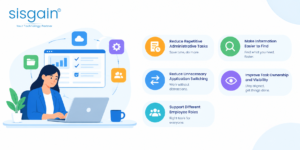
Improving workplace productivity with technology begins with understanding how employees spend their time and where avoidable friction occurs. Adding applications does not automatically increase productivity. In some cases, more notifications, duplicated records, and disconnected interfaces make work harder.
Reduce Repetitive Administrative Tasks
Identify recurring activities that follow predictable rules, such as routing requests, sending status notifications, collecting standard information, or assigning routine tasks.
Automation may reduce manual effort in these processes, but businesses should first clarify responsibilities and exceptions. The purpose is to remove unnecessary work while preserving appropriate checks and human judgement.
Make Information Easier to Find
Employees may lose time searching through folders, email, messaging platforms, and separate business systems. A combination of organised content, clear naming conventions, reliable search, and assigned content ownership can make information easier to locate.
Businesses should also define where official documents belong. If several versions of a policy are circulating, better search alone may not resolve the problem.
Reduce Unnecessary Application Switching
Review the systems employees use for common tasks. Where appropriate, provide a clear entry point to frequently used applications or integrate steps that depend on shared information.
Avoid trying to place every function into one interface if doing so creates a confusing experience. The objective is to simplify the employee journey, not to force unrelated activities into a single tool.
Improve Task Ownership and Visibility
Shared task records and defined workflows can clarify who is responsible for the next step, what information is required, and whether an item is waiting for action.
This can reduce follow-up messages and help managers identify bottlenecks. It is important to keep the process simple enough that employees can maintain accurate records without excessive administrative effort.
Support Different Employee Roles
Productivity needs differ across departments. A field employee may need mobile access to a procedure, while a finance employee may need controlled document approvals and a project manager may need a clear view of dependencies.
Design the workplace around real role-based tasks. Gather feedback from employees who use the tools daily, and test the proposed experience before wider deployment.
The Role of IT Service Management in a Digital Workplace
A digital workplace relies on technology that employees can access and use reliably. When applications fail, access is missing, or employees do not know where to request assistance, even a well-designed environment can become frustrating.
An IT service management consultant can help an organisation review how IT services are requested, delivered, supported, and improved. Depending on the business requirements, this work may include assessing service desk processes, incident handling, request fulfilment, knowledge management, access workflows, and service performance reporting.
Make IT Support Easier to Access
Employees should know how to report an issue and what information to provide. A clear service portal can help direct requests to the appropriate team and provide visibility into their status.
Common problems may also be addressed through approved knowledge articles or self-service guidance. This can help employees resolve straightforward issues without waiting for support, while more complex problems remain available for specialist handling.
Standardise Common Requests
Requests for application access, software installation, device support, or account changes often follow repeatable steps. Defined workflows can clarify approval requirements, responsibilities, and expected handling procedures.
Standardisation should not mean treating every request identically. Sensitive access requests or unusual technical issues may need additional review.
Use Service Data to Improve the Workplace
IT service records can reveal recurring issues, confusing processes, or applications that generate disproportionate support demand. When interpreted alongside employee feedback and operational context, this information can help teams prioritise improvements.
The goal is to resolve underlying problems where possible, not merely close more tickets. If a large number of employees contact IT about the same recurring issue, improving the system or instructions may be more valuable than handling each request separately.
Workforce Optimisation and Digital Workplace Planning
Workplace technology can help organisations coordinate capacity, clarify responsibilities, and reduce avoidable administrative work. However, workforce optimization software uae businesses consider should be selected according to the operational problem they need to solve, rather than as a general substitute for digital workplace planning.
Workforce optimisation tools may support scheduling, task allocation, workload visibility, or operational planning, depending on the product. They are not necessarily the same as collaboration platforms or employee portals, although they may connect with those systems.
Identify the Workforce Challenge First
A business may need to improve shift coverage, balance service workloads, coordinate field teams, or provide managers with better visibility into operational demand. Each requirement calls for a different set of capabilities.
For example, a customer service operation may focus on staffing levels and workload distribution, while a field service team may need to coordinate appointments, locations, and available technicians.
Consider the Employee Experience
Optimisation should not focus exclusively on operational output. Employees need understandable schedules, clear task assignments, suitable breaks, and a way to raise concerns when plans do not reflect real conditions.
Technology should support better coordination rather than create unrealistic expectations or unnecessary monitoring. The business should explain what information is collected and how it will be used.
Connect Workforce Tools With Wider Workplace Systems
Where there is a clear need, workforce systems may exchange relevant information with employee services, communication tools, or operational platforms. Integration should be planned carefully to avoid duplicated records and inconsistent updates.
The organisation should define which system owns each record, who can access it, and how errors are corrected. These details matter when workforce information influences scheduling, customer commitments, or other operational decisions.
How to Measure Digital Workplace ROI
A digital workplace investment should be evaluated through its contribution to business objectives, not only through the number of applications deployed. How to measure digital workplace ROI depends on the purpose of the initiative, the costs involved, and the outcomes the organisation can reasonably track.
Return on investment (ROI) is one useful measure, but it should be considered alongside employee experience, service quality, risk reduction, and long-term operational capability.
Establish a Baseline Before Implementation
Before making a change, record how the relevant process performs today. Depending on the use case, the baseline might include average request completion time, the number of manual steps, the frequency of repeated support requests, or employee feedback about finding information.
The baseline gives the business a reference point for evaluating whether the new process has made a meaningful difference.
Calculate the Total Cost of Ownership
The cost of a digital workplace includes more than software licences. Depending on the project, the organisation may need to account for:
- Platform subscriptions and usage charges.
- Implementation, configuration, and integration.
- Data migration and content preparation.
- Employee training and change management.
- Security reviews and testing.
- Ongoing administration, support, and maintenance.
- Future upgrades and additional capacity.
A solution with a low initial price may still require significant ongoing effort. Businesses should compare options over a suitable period and include the costs required to keep the workplace secure and useful.
Estimate the Value of Time Saved
Suppose a company improves a repetitive process and employees spend less time completing each request. The business can estimate the time saved by comparing the old and new process, then multiplying the difference by the relevant number of completed tasks.
For illustration, if a task takes five minutes less after an improvement and is completed 1,000 times during a defined period, the estimated time released is 5,000 minutes. This is an operational estimate, not automatically a cash saving.
The organisation should consider whether the released time is used productively, whether service quality improves, and whether any costs are actually reduced.
Track Service and Quality Improvements
Some benefits may be better reflected in service performance than in direct financial savings. Examples include fewer incomplete requests, clearer task ownership, more consistent onboarding, improved access to approved information, or fewer repeated support contacts.
Where appropriate, track quality and employee feedback alongside speed. A process that becomes faster but produces more errors may not represent a genuine improvement.
Use a Practical ROI Formula
The challenge is defining and measuring benefits consistently. Financial savings, cost avoidance, released employee capacity, and qualitative improvements should not be treated as interchangeable. Explain the assumptions behind each estimate and avoid counting the same benefit twice.
Review Results Over Time
The first few weeks after launch may reflect training, adjustment, or temporary disruption rather than normal performance. Businesses should review results over a suitable period and account for changes in workload, employee numbers, and process complexity.
Use the findings to decide whether to expand the initiative, improve the design, or reconsider the investment. ROI measurement is most useful when it informs decisions rather than simply justifying a purchase that has already been made.
Security, Governance, and Responsible Technology Use
Security and governance are central to digital workplace planning because employees may access internal documents, personal information, business records, and specialist applications through connected systems.
A secure workplace should protect information while allowing authorised employees to complete their tasks without unnecessary barriers.
Define Access and Information Ownership
Determine who owns each major system, who maintains its information, and which employee groups should have access. Permissions should reflect job responsibilities and be reviewed when roles change.
Businesses should also identify authoritative sources for important information. For example, an approved policy should have a clear owner and a known location, rather than existing in several uncontrolled copies.
Protect Accounts and Devices
Use suitable authentication, access controls, and device policies based on the organisation’s risk profile. Access should be removed promptly when it is no longer needed, and unusual or unauthorised activity should be handled through established procedures.
Employees also need clear guidance about protecting confidential information, handling suspicious messages, and using approved tools.
Set Rules for AI and Automation
Before introducing AI-assisted workplace tools, decide what information can be processed, which users can access results, and when human review is required. Test how the system responds to incomplete, outdated, or conflicting information.
Automated workflows also need oversight. Define what happens when a task fails, an approval is delayed, or an unusual case falls outside the standard process.
Keep Governance Proportionate
Controls should reflect the sensitivity of the information and the consequences of a failure. Excessively complicated approval procedures can create workarounds, while insufficient controls can expose the organisation to avoidable risks.
A practical governance model identifies responsibilities, establishes clear rules, and reviews them as the business and its technology evolve.
The Future of Augmented Reality Experiences in the Digital Workplace
The Future of augmented reality experiences may create new ways for employees to access contextual instructions, visual information, and remote assistance while performing practical tasks. Augmented reality (AR) can overlay digital content onto a view of the physical environment through supported devices.
AR is not a core requirement for every digital workplace. Its suitability depends on whether visual guidance solves a real problem better than existing instructions, video calls, mobile applications, or conventional training.
Potential Workplace Use Cases
In suitable environments, AR may support guided equipment maintenance, visual product information, remote expert assistance, and practical training. A technician could potentially receive visual guidance while inspecting equipment, while a trainee might use an interactive demonstration to understand a sequence of steps.
These applications require careful design. Instructions must be accurate, the interface should not distract employees from safety-critical tasks, and users need an alternative when the required device or connection is unavailable.
Evaluate Practical Readiness
Before investing in AR, businesses should consider device costs, content creation, employee training, system integration, maintenance, and the working conditions in which the technology would be used.
A pilot should focus on a clearly defined task and compare the experience with the existing process. Relevant measures might include training completion, task accuracy, support needs, or the time required to complete a procedure. The organisation should also gather employee feedback and review any safety or privacy implications.
AR should be treated as one potential capability within a wider workplace strategy, not as a technology that every business must adopt to remain competitive.
Common Mistakes to Avoid When Planning a Digital Workplace
Even a well-funded initiative can struggle if the organisation focuses on tools without considering the people and processes around them.
Buying Tools Before Defining the Problem
A platform may appear attractive because it offers many features, but the business may not need most of them.
Better approach: Define the operational problem, identify the employees affected, and create requirements before comparing solutions.
Trying to Change Everything at Once
A large-scale rollout can overwhelm employees and IT teams, especially when multiple systems and workflows change simultaneously.
Better approach: Use phases, test priority use cases, and apply lessons from early deployments before expanding.
Ignoring Employee Feedback
Employees may find that a process designed in a meeting does not fit the realities of their daily work.
Better approach: Involve representative users in discovery, pilot testing, and post-launch reviews. Make it easy for them to report problems.
Neglecting Training and Communication
Employees may continue using old processes if they do not understand the new system or see its value.
Better approach: Explain why changes are being introduced, provide role-specific guidance, and make support accessible.
Overlooking Governance and Maintenance
An employee portal can quickly become unreliable if nobody reviews its content, manages permissions, or updates broken workflows.
Better approach: Assign ownership, define review schedules, and include ongoing maintenance in the operating plan.
Measuring Activity Instead of Outcomes
High sign-in counts do not necessarily mean employees are completing tasks more effectively.
Better approach: Track task success, process performance, service quality, employee feedback, and relevant costs alongside usage.
A Practical Starting Plan for UAE Businesses
Businesses that have not yet formalised their digital workplace approach can start with a focused plan rather than waiting for a large transformation programme.
First: Identify Three Priority Problems
Ask employees and managers which workplace activities create the most repeated effort or confusion. Select a small number of problems with clear business impact, such as locating internal guidance, submitting service requests, or coordinating approvals.
Second: Review Existing Capabilities
Identify the applications already available and determine whether better configuration, integration, or training could address the issues. This helps avoid unnecessary purchases and overlapping tools.
Third: Set Measures and Responsibilities
Assign an owner to each improvement and define how success will be assessed. Establish a baseline before making changes, and make sure the measures reflect actual employee and business outcomes.
Fourth: Test With a Small Group
Run a pilot with employees who represent the intended users. Observe whether they can complete the relevant tasks, collect feedback, and address problems before a wider rollout.
Fifth: Expand Based on Evidence
Use the pilot results to refine the solution and decide whether it is ready to expand. Continue reviewing performance after rollout, and adjust the roadmap as business needs change.
This approach makes digital workplace planning manageable. It gives the organisation a way to demonstrate value, learn from experience, and build a stronger foundation for future improvements.
How SISGAIN Technologies Can Support Digital Workplace Initiatives
SISGAIN Technologies works with businesses exploring technology solutions to support operational needs and digital transformation goals. A practical workplace initiative begins by understanding how employees work, which applications they depend on, and where disconnected processes create unnecessary effort. Businesses can assess their current environment, define their priorities, and plan suitable capabilities around usability, integration, security, and long-term support. A structured approach helps decision-makers evaluate technology options more clearly and align implementation with business requirements. The right solution should reflect the organisation’s specific needs rather than introduce complexity that employees and IT teams cannot easily maintain.

Conclusion
A successful digital workplace strategy gives UAE businesses a structured way to connect technology investments with real employee and operational needs. It helps organisations move beyond disconnected applications and make deliberate decisions about information access, collaboration, automation, security, and workplace processes.
The most effective starting point is to understand the current environment, identify the problems that matter most, and define clear outcomes before choosing new technology. A phased roadmap then allows the business to test improvements, support employees, manage risk, and expand what works.
In 2026, businesses should evaluate emerging capabilities carefully rather than adopting every new trend. AI-assisted search, automation, integrated collaboration, and other technologies can be valuable when they address a defined requirement and are supported by appropriate governance.
Ultimately, the goal is not to create the workplace with the most tools. It is to build an environment where employees can access reliable information, complete important tasks, and collaborate effectively—and where the organisation can demonstrate whether its investment is delivering meaningful value.
Frequently Asked Questions
1. What should a digital workplace strategy include in 2026?
It should include business objectives, employee needs, existing technology assessment, application integration, information management, security, governance, training, implementation planning, and performance measurement. The strategy should be reviewed as business requirements evolve.
2. How can UAE businesses start digital workplace transformation?
Businesses can begin by identifying common employee challenges, reviewing existing applications, and selecting a small number of high-priority improvements. A pilot helps test usability and business value before a wider rollout.
3. What are the biggest digital workplace trends in 2026?
Areas worth evaluating include AI-assisted knowledge search, workflow automation, connected collaboration platforms, employee self-service, stronger identity management, and improved workplace analytics. Their suitability depends on business needs, security requirements, and implementation readiness.
4. How do businesses choose the right digital workplace platform?
They should compare platforms against employee requirements, usability, integration capabilities, security, accessibility, scalability, support needs, and total cost of ownership. The best choice is the one that solves defined problems without adding unnecessary complexity.
5. How can a company measure digital workplace ROI?
A company can compare the total cost of implementation and ongoing operation with measured benefits, such as reduced process delays, lower administrative effort, improved service quality, or fewer repeated support requests. It should establish a baseline and document the assumptions behind financial estimates.
6. What are the main challenges of digital workplace transformation?
Common challenges include low employee adoption, disconnected applications, unclear ownership, poor information quality, security risks, insufficient training, and difficulty measuring results. Phased implementation, employee involvement, clear governance, and regular reviews can help address these issues.