
Businesses across the UAE are continuously looking for ways to improve productivity, reduce repetitive work, and manage operations more efficiently. As organisations expand, everyday activities such as data entry, approval management, report preparation, customer communication, and information sharing can become increasingly time-consuming. When these activities depend heavily on manual effort, employees may spend less time on tasks that require their attention and expertise.
This is where Business Workflow Automation becomes useful. It helps organisations structure routine activities through digital tools, predefined rules, and connected applications. Instead of relying on repeated manual actions, businesses can create workflows that move tasks between employees and systems with greater consistency.
However, not every business process should be automated. Some activities require human judgement, while others may be too complex or poorly defined for immediate automation. Businesses first need to understand how their operations work, identify repetitive tasks, and evaluate which processes can benefit from automation.
For UAE businesses, selecting the right processes is an important step towards improving operational efficiency. This guide explains how to identify automation opportunities, evaluate workflows, choose suitable technologies, and plan implementation in a structured way.
Understanding Business Workflow Automation
What Is Business Workflow Automation? It is the use of digital tools and predefined rules to manage the movement of tasks, information, and approvals within an organisation. It allows routine activities to progress through a defined sequence without requiring employees to manually coordinate every step.
For example, when an employee submits a leave request, an automated workflow can send it to the appropriate manager, record the decision, update the request status, and notify the employee. The process follows predefined rules while allowing a person to make the approval decision.
Workflow automation can be applied across different departments, including:
- Human resources and employee management.
- Finance and invoice processing.
- Sales and customer relationship management.
- Procurement and purchase approvals.
- Customer support and service requests.
- Operations and internal reporting.
- IT support and service management.
The main purpose is to make business activities more organised, consistent, and easier to monitor. Automation does not necessarily remove employees from a process. Instead, it can reduce repetitive coordination and allow employees to focus on decisions and activities that require human involvement.
Why Businesses Are Considering Automation
As organisations grow, the number of tasks, approvals, records, and communication activities also increases. Processes that are manageable for a small team may become difficult when several departments or locations are involved.
Manual workflows can create delays when employees need to transfer information between applications, follow up on pending approvals, or repeatedly enter the same details. These activities can also make it difficult for managers to understand where work is delayed.
Automation can help address these issues by introducing consistent task routing, notifications, status updates, and information handling.
For UAE organisations operating in competitive markets, improving internal processes can support better service delivery and more effective resource utilisation. However, the technology should be selected according to actual business requirements rather than adopted simply because automation is becoming popular.
Why Identifying the Right Processes Matters
Automation projects are more effective when they begin with a clear understanding of the problem. If a business automates an inefficient process without reviewing it, unnecessary steps may remain part of the new workflow.
For example, an organisation may use several approval stages for a routine request. Automating the existing process without evaluating those stages may make the request move faster but will not necessarily make the overall process simpler.
Identifying suitable processes helps businesses focus on activities where automation can provide practical value.
Better Use of Employee Time
Employees often handle repetitive administrative activities alongside their main responsibilities. Automating suitable tasks can reduce the time spent on routine coordination and allow teams to focus on more important work.
More Consistent Task Handling
Manual processes may differ depending on who handles a particular activity. A defined automated workflow can apply the same rules and sequence to similar requests.
Improved Process Visibility
When workflows include status updates and activity records, managers can understand which tasks are pending, completed, or awaiting approval.
Reduced Repeated Data Entry
Connected applications and automated data transfers can reduce the need to enter the same information in multiple systems. This may also help minimise errors caused by manual handling.
Easier Operational Monitoring
Digital workflows can make it easier to review processing times, identify delays, and understand where improvements may be required.
How to Identify Repetitive Business Tasks
One of the first steps in selecting automation opportunities is understanding which activities employees perform repeatedly. These tasks may happen daily, weekly, or whenever a particular business event occurs.
How to Identify Repetitive Business Tasks starts with observing how work is completed across departments. Businesses should speak with employees, review existing procedures, and understand how information moves between people and applications.
Common signs of repetitive work include:
- Employees entering similar information into multiple systems.
- Regular preparation of reports using the same data sources.
- Repeated follow-up emails for approvals or updates.
- Manual transfer of information between applications.
- Routine document classification and record updates.
- Similar customer requests handled through a fixed process.
- Regular notifications and reminders sent manually.
For example, a finance department may receive invoices through email and manually enter their details into an accounting application. If the information follows a consistent format, parts of the process may be suitable for automation.
However, businesses should not assume that every repetitive activity is automatically suitable. They should also evaluate task complexity, exception frequency, data quality, and the level of human judgement required.
Reviewing Existing Workflows Before Automation
Before choosing a process for automation, organisations should understand how it currently operates. This involves identifying the people involved, the information required, the applications used, and the steps followed from beginning to completion.
A useful review should answer questions such as:
- What triggers the process?
- Who is responsible for each activity?
- Which information is required?
- How many manual steps are involved?
- Which applications are used?
- Where do delays usually occur?
- What exceptions can interrupt the process?
- How is completion recorded?
Businesses can use process mapping to represent the sequence of activities visually. This helps employees and managers understand how work moves through the organisation.
For example, a purchase request may involve an employee, department manager, finance team, and procurement department. Mapping the process can reveal repeated approvals, unnecessary communication, or missing information that causes delays.
Once the current workflow is understood, the organisation can decide whether it should be simplified, standardised, integrated, or automated.
Business Activities That May Be Suitable for Automation
Some processes are more suitable for automation because they follow clear rules and involve predictable actions. These activities generally require structured information and have limited variation.
Data Entry and Information Transfer
Businesses often need to move information between spreadsheets, applications, databases, and internal systems. Where the data structure is consistent, automated transfers may reduce repeated manual entry.
Approval Management
Routine approvals can be supported through digital workflows that route requests to the appropriate person and send notifications when action is required.
Report Preparation
Regular reports that use consistent data sources may be partially automated. Systems can collect information, organise it, and generate reports according to a defined schedule.
Employee Onboarding
Some onboarding activities follow a standard sequence, such as creating accounts, assigning forms, sharing documents, and notifying relevant departments.
Customer Request Management
Customer enquiries and service requests can be categorised and directed to the appropriate team using predefined rules.
Invoice and Document Handling
Structured invoices and standard documents may be processed using suitable document management and automation tools, with human review for exceptions.
Common Workflow Automation Examples Across Departments
Businesses can understand automation opportunities more easily by looking at activities that already happen in their departments.
Workflow Automation Examples include practical situations where routine steps can be managed through digital workflows.
Human Resources
An HR department may use workflows for leave requests, employee onboarding, document collection, and internal policy acknowledgements. Employees submit information through a digital form, and the workflow directs the request to the appropriate person.
Finance
Finance teams may automate invoice notifications, expense submission, payment approval routing, and recurring report preparation. Sensitive financial decisions can remain subject to authorised human approval.
Sales
Sales teams may use automation to assign incoming enquiries, update customer records, schedule reminders, and notify employees about follow-up activities.
Customer Support
Customer service workflows can route requests according to their category, urgency, or assigned department. Notifications can help employees track unresolved cases.
Procurement
Purchase requests can follow a predefined approval sequence based on department, request type, or internal policy. The system can also maintain a record of the request’s status.
IT Operations
Internal IT requests can be assigned to support teams, categorised, and tracked through a service management workflow.
These examples demonstrate that automation can support different business functions. The right application depends on process stability, available technology, and the organisation’s operational priorities.
Evaluating the Potential Value of Each Process
After identifying repetitive activities, businesses should evaluate which ones deserve attention first. Automating every possible task at the same time may increase complexity and make implementation difficult to manage.
A practical evaluation should consider several factors.
Frequency of the Activity
Tasks performed many times each day or week may offer more opportunities for reducing repetitive effort than activities performed occasionally.
Time Required
Businesses should estimate how much employee time is spent completing the activity. Processes that require substantial manual coordination may deserve closer review.
Error Frequency
If a process regularly experiences data entry mistakes or missed steps, automation may help improve consistency, provided the underlying rules and information are reliable.
Process Stability
Activities with clearly defined steps are generally easier to automate than workflows that change frequently or depend heavily on individual judgement.
Business Importance
Some processes directly affect customers, payments, compliance, or essential operations. These require careful evaluation before any changes are introduced.
Implementation Requirements
Businesses should consider application compatibility, data availability, security, implementation effort, and ongoing maintenance.
This evaluation helps organisations prioritise processes according to their potential value and practical suitability.
Improving the Structure of Existing Business Processes
Automation should follow process improvement, not replace it. Businesses should first remove unnecessary steps, clarify responsibilities, and standardise the way activities are completed.
Business Workflow Optimization involves reviewing how tasks move through an organisation and identifying opportunities to improve their sequence, coordination, and visibility.
For example, if an employee must contact three departments to obtain information for a routine request, the organisation may need to improve information sharing before introducing automation.
Process improvement may involve:
- Removing duplicate activities.
- Reducing unnecessary approval stages.
- Defining clear responsibilities.
- Standardising forms and information requirements.
- Improving communication between departments.
- Connecting applications where appropriate.
- Establishing clear rules for exceptions.
Once the workflow is simplified, businesses can determine which steps should be automated and which should remain under human control.
Planning a Structured Automation Initiative
A successful automation initiative needs clear objectives, defined responsibilities, suitable technology, and an implementation plan.
The Steps to Implement Workflow Automation should begin with understanding the current process and continue through solution selection, testing, deployment, and monitoring.
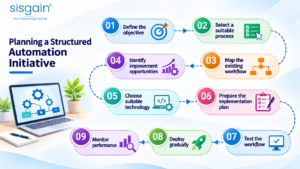
A structured approach may include the following stages:
- Define the objective: Identify the operational problem the organisation wants to address.
- Select a suitable process: Choose an activity with clear steps and realistic automation potential.
- Map the existing workflow: Document tasks, responsibilities, information, and exceptions.
- Identify improvement opportunities: Simplify unnecessary steps before introducing automation.
- Choose suitable technology: Evaluate workflow platforms, integrations, or RPA tools according to requirements.
- Prepare the implementation plan: Define scope, responsibilities, resources, and timelines.
- Test the workflow: Check normal scenarios, exceptions, access permissions, and data accuracy.
- Deploy gradually: Introduce the workflow to the relevant employees and departments.
- Monitor performance: Review results and make improvements when necessary.
Starting with a manageable process can help organisations understand implementation requirements before expanding automation across other business functions.
Understanding the Role of Technology Specialists
Automation projects often involve business teams, software applications, data systems, and infrastructure. Organisations may need technical guidance to understand how these elements should work together.
When evaluating external support, businesses considering it consultants in uae should look for professionals who understand both business operations and technology requirements.
A suitable technology specialist can help review existing systems, identify integration gaps, assess security requirements, and recommend appropriate automation approaches.
For example, a business may want to automate customer request handling, but its customer records and support platform may not be connected. A technical assessment can help determine whether integration is possible and what changes are required.
The focus should remain on solving the operational problem rather than introducing additional tools without a clear purpose.
Considering Technology Capabilities Before Selecting a Solution
Different automation requirements may need different technology capabilities. Some workflows can be managed through standard business applications, while others may require integrations, custom development, or RPA.
Businesses evaluating an it solutions provider dubai should explain their current processes, technology environment, expected outcomes, and implementation constraints.
The provider should be able to discuss how a proposed solution will fit with existing systems, what information it will require, and how employees will interact with the updated workflow.
Decision-makers should also review scalability, support arrangements, data protection, and the possibility of future process changes.
Selecting technology based on business requirements can help avoid unnecessary complexity and improve the long-term usefulness of the solution.
Managing Automation Across Larger Organisations
Enterprises may have more complex workflows because several departments, locations, applications, and approval structures are involved. An automation initiative that works for one team may need additional planning before it can be introduced across the organisation.
Organisations exploring it consulting services for enterprises should consider how automation will connect with existing infrastructure, enterprise applications, data policies, and operational responsibilities.
For example, an organisation may have separate approval procedures across different departments. Before introducing a common workflow, it should understand which rules can be standardised and which require department-specific handling.
Enterprise automation planning should also address access permissions, integration dependencies, monitoring, documentation, and employee training.
A phased implementation can help organisations introduce changes gradually while reviewing their impact on different business units.
Using RPA for Repetitive Digital Activities
Robotic process automation is one technology businesses can consider when they need to automate structured, rule-based activities performed through digital applications.
RPA software bots can be configured to interact with applications and perform predefined actions, such as transferring information, updating records, and preparing routine reports.
Organisations considering rpa implementaion services in uae should first evaluate whether their selected tasks are stable, repetitive, and suitable for rule-based automation.
A suitable assessment should include process mapping, application compatibility, data requirements, exception handling, security, testing, and maintenance.
For example, a company may have a routine process for transferring structured information from one application to another. An RPA solution may help perform the transfer according to predefined rules, while exceptions can be directed to employees for review.
The technology should be selected according to the process rather than assuming that RPA is suitable for every type of workflow.
Understanding Different RPA Implementation Requirements
RPA projects require more than configuring software bots. Businesses need to understand the applications involved, the tasks to be automated, and the conditions under which the automation should operate.
Companies exploring rpa robotic process automation dubai solutions should evaluate how the proposed approach will interact with their existing applications and business rules.
Important considerations include:
- Process suitability and stability.
- Availability of structured information.
- Application compatibility.
- User access and permissions.
- Exception management.
- Testing and validation.
- Monitoring and maintenance.
For instance, a process that frequently changes its rules may require additional controls and ongoing updates. A stable process with clearly defined inputs and outputs may be easier to manage.
The implementation should also include a way for employees to identify and report issues when an automated activity does not work as expected.
Getting Specialist Guidance for Automation Planning
Businesses may not always have the internal expertise required to evaluate automation tools, design workflows, and manage implementation. External specialists can help assess requirements and identify an appropriate approach.
Organisations considering rpa consulting services uae should discuss their operational challenges before selecting a technology. A consulting engagement may include process assessment, use-case identification, feasibility review, solution recommendations, and implementation planning.
The provider should explain which activities can realistically be automated, what dependencies exist, and where human review will remain necessary.
This is especially important when processes involve sensitive information, financial records, customer data, or multiple connected applications.
A clear scope and realistic implementation plan can help businesses understand the work involved before committing resources.
Connecting Workflow Automation With Wider Business Improvements
Automation can support a larger business improvement programme when it is connected with other operational and technology initiatives.
A business process automation service may help organisations review repetitive activities, simplify workflows, connect applications, and introduce suitable digital tools.
However, businesses should avoid treating automation as an isolated technology project. They should consider how process changes affect employees, customers, data, and other departments.
For example, automating a customer request process may require changes to customer records, notification systems, reporting, and employee responsibilities.
When these dependencies are considered early, organisations can plan a more consistent implementation and reduce the possibility of disconnected workflows.
Understanding How Technology Guidance Supports Growth
Technology decisions can influence how efficiently an organisation operates, how well departments coordinate, and how easily new services can be introduced.
The Role of IT Consultants in Business Growth includes helping organisations understand their technology requirements, evaluate existing systems, and plan improvements that support business objectives.
For example, a growing company may need to connect its sales, finance, and customer support applications. A technology consultant can help assess the integration requirements and recommend an approach that fits the organisation’s existing environment.
Consultants can also help businesses prioritise projects, review implementation risks, and consider how technology investments will support future requirements.
Their recommendations should be based on the organisation’s actual challenges and available resources.
Exploring Automation Opportunities Across Different Industries
Automation requirements vary by industry because each sector follows different operational procedures and information flows.
RPA Use Cases Across Industries can include structured activities in finance, healthcare administration, logistics, retail, manufacturing, and professional services.
For example:
- Finance: Routine invoice information processing, report preparation, and record updates.
- Healthcare administration: Appointment-related data handling and standard administrative workflows, with appropriate privacy and human oversight.
- Logistics: Structured shipment record updates, document handling, and routine status notifications.
- Retail: Inventory record updates, order information transfers, and standard reporting.
- Manufacturing: Routine data collection, production record updates, and administrative reporting.
- Professional services: Document classification, standard form processing, and internal request management.
These are potential applications, not universal recommendations. Businesses should evaluate each process according to its data requirements, risk level, system compatibility, and need for human judgement.
Preparing the Organisation for Workflow Changes
Automation changes the way employees complete tasks and interact with business systems. Even a technically successful workflow may face adoption difficulties if employees do not understand the new process.
Businesses should explain why the change is being introduced, what activities will be affected, and how employees will use the updated workflow.
Training should focus on practical tasks, including submitting requests, reviewing notifications, handling exceptions, and reporting issues.
Organisations should also collect employee feedback during early implementation. Employees who perform the process regularly may identify practical problems that were not obvious during planning.
For businesses introducing wider digital changes, Digital workplace adoption challenges may include employee resistance, limited technical familiarity, unclear responsibilities, and difficulties adjusting to new tools.
Addressing these issues through communication, training, and ongoing support can help employees adapt to the updated working environment.
A Practical Approach to Automating Business Processes
Automation projects become easier to manage when organisations follow a consistent method. Instead of selecting multiple processes at once, businesses can begin with a clear operational problem and evaluate a suitable improvement.
The Steps to Automate Business Processes should include understanding the existing workflow, identifying repetitive activities, evaluating process suitability, selecting technology, testing the solution, and monitoring its performance.
Businesses can begin with a pilot project involving a limited number of users or a single department. This allows the organisation to review the workflow, identify exceptions, and make necessary adjustments before expanding it.
The pilot should have clearly defined success measures. These may include processing time, number of manual steps, error frequency, task completion rates, or employee feedback.
Once the results are reviewed, the organisation can decide whether to expand the solution, modify the workflow, or consider a different approach.
Common Mistakes to Avoid When Selecting Processes
Identifying the wrong processes can create unnecessary implementation work and reduce the value of an automation project.
Automating an Unclear Process
If employees follow different procedures for the same activity, the organisation should first establish a consistent workflow.
Choosing Technology Before Understanding Requirements
A tool should be selected based on the process, system environment, and business objective. Starting with a product can lead to unsuitable decisions.
Ignoring Exceptions
Not every request or transaction follows the standard sequence. Businesses should define how unusual situations will be handled.
Overlooking Data Quality
Automation depends on reliable information. Incorrect, incomplete, or inconsistent data can affect workflow results.
Underestimating Employee Training
Employees need to understand how the new process works and what responsibilities they have after implementation.
Automating Too Many Processes at Once
Large automation programmes can be difficult to coordinate. A phased approach allows organisations to learn from early implementations.
Measuring the Results of Workflow Automation
Businesses should define success measures before implementing automation. These measures should reflect the problem the organisation wants to solve.
Useful indicators may include:
- Time required to complete a process.
- Number of manual steps removed.
- Frequency of processing errors.
- Number of requests completed within expected timelines.
- Employee time spent on repetitive activities.
- Percentage of tasks completed successfully.
- Frequency of workflow exceptions.
- Employee and customer feedback.
For example, if a business automates routine approval notifications, it may monitor how quickly requests move between employees and how many remain pending.
Results should be reviewed over time rather than evaluated only immediately after deployment. This helps organisations identify whether the workflow continues to meet operational requirements as the business changes.
How Can We Supports Business Automation Requirements
SISGAIN Technologies operates in the IT solutions and software development space, supporting organisations with technology-related requirements.
Businesses planning workflow improvements may need to evaluate their existing applications, understand process requirements, and identify suitable digital solutions. Depending on the project, this may involve custom software development, application integration, mobile solutions, or other technology capabilities.
A successful automation initiative should begin with a clear understanding of the business problem. Organisations should identify the activities they want to improve, define the expected outcome, and consider how the proposed solution will fit into their existing environment.
For UAE businesses, important considerations include system compatibility, operational requirements, security, scalability, and employee adoption.
SISGAIN Technologies can be considered by organisations evaluating software and technology support for their business requirements. Businesses should discuss their project scope, existing systems, expected outcomes, and implementation needs before deciding on a suitable approach.

Conclusion
Identifying the right processes is one of the most important steps in business workflow automation. UAE businesses should begin by reviewing their existing operations, understanding repetitive activities, and evaluating where manual effort creates delays or unnecessary complexity.
Not every process needs automation. Organisations should prioritise activities that follow clear rules, use reliable information, and offer practical opportunities for improvement. They should also simplify workflows before introducing technology and consider employee responsibilities, security, integration, and maintenance.
A structured approach allows businesses to begin with manageable projects, evaluate results, and expand automation when it delivers meaningful value. By connecting process improvements with wider business objectives, organisations can create more consistent workflows and prepare their operations for future growth.
Frequently Asked Questions
1. What is business workflow automation?
Business workflow automation uses digital tools and predefined rules to manage routine tasks, approvals, notifications, and information movement within an organisation. It helps reduce repetitive manual coordination and improve process consistency.
2. How can UAE businesses identify processes for automation?
Businesses can review daily operations, speak with employees, map existing workflows, and identify repetitive activities involving manual data entry, repeated approvals, information transfers, and routine reporting. They should then evaluate process stability, frequency, complexity, and potential value.
3. Which business processes are best suited for automation?
Processes with clear rules, predictable steps, structured information, and limited exceptions are often suitable. Examples include routine approvals, report preparation, data transfers, employee onboarding activities, and standard customer request routing.
4. Is RPA the same as workflow automation?
No. Workflow automation is a broader concept that manages the sequence of tasks and information across a process. RPA is one technology that can automate specific rule-based digital activities by interacting with applications.
5. How should a business start an automation project?
A business should begin by defining the problem, selecting a suitable process, mapping existing steps, identifying improvements, choosing appropriate technology, and testing the workflow. Starting with a small pilot can help evaluate results before wider implementation.
6. How can businesses measure the success of automation?
Businesses can measure processing time, manual effort, error frequency, task completion rates, workflow exceptions, and employee feedback. The selected indicators should match the original objectives of the automation project.