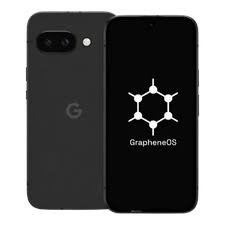
An overview of the ZeroGhost Privacy Phone, its GrapheneOS operating system, privacy controls, and important buyer considerations.
Introduction
For people who want more control over their personal information, a privacy-focused smartphone may be worth considering. The ZeroGhost Privacy Phone is marketed as a smartphone configured with GrapheneOS, an open-source mobile operating system focused on improving privacy and security while maintaining compatibility with many Android applications.
Smartphones have become an essential part of everyday life. People use them to communicate, browse the internet, manage finances, access work documents, store photographs, and sign in to personal accounts. While these capabilities make smartphones convenient, they also raise important questions about data collection, application permissions, online tracking, and digital security.
Unlike choosing a phone based only on its camera, screen, or processing speed, choosing a privacy-focused device requires a closer look at its operating system, security updates, application compatibility, and setup. Buyers should also understand that no smartphone can eliminate every privacy risk.
This guide explains what the ZeroGhost Privacy Phone is, how GrapheneOS fits into its approach, which features matter for everyday users, and what to check before deciding whether the device meets your needs.
What Is the ZeroGhost Privacy Phone?
ZeroGhost is marketed as a privacy-focused smartphone built using Google Pixel hardware with GrapheneOS installed. According to the product information on its website, the company offers different device configurations designed to give buyers a choice of hardware and performance levels. Buyers should check the current listing for the exact model, specifications, condition, and software support period.
The main idea behind this type of phone is to make privacy and security important parts of the device’s setup rather than relying entirely on the default software configuration of a conventional smartphone.
A privacy-focused operating system can provide additional controls over applications, permissions, and certain system behaviors. However, the practical level of protection depends on the hardware, software version, configuration, applications installed, and the user’s habits.
The ZeroGhost Privacy Phone may interest people who want a device that is prepared for privacy-conscious use without having to install and configure an alternative operating system themselves.
Before purchasing, confirm which model is being sold, whether the device is new or renewed, which operating system version is installed, and how future updates will be delivered.
What Is GrapheneOS, and Why Does It Matter?
GrapheneOS is an open-source operating system based on the Android Open Source Project. Its development focuses on improving mobile security and privacy while retaining useful functionality and Android application compatibility. Its official documentation describes features related to application isolation, permission controls, exploit mitigation, and other security improvements.
The operating system is an important part of the ZeroGhost Privacy Phone’s advertised identity. Nevertheless, buyers should distinguish between the capabilities of GrapheneOS itself and the additional services, hardware choices, or setup practices provided by a phone seller.
GrapheneOS is not simply a cosmetic interface. It includes technical changes intended to strengthen the security model of supported devices. The specific protections available depend on the device and software version.
Its documentation provides information about features, supported devices, installation, and common questions.
Why Are People Looking for Privacy-Focused Smartphones?
Interest in mobile privacy comes from several everyday concerns. People may not want every application to access their contacts, location, microphone, photographs, or other information without a clear reason.
Common motivations include the following.
1. Greater Control Over Personal Data
A smartphone can hold messages, photographs, work files, browsing information, and authentication details. Users may want more control over which applications can access this information and when.
Privacy-focused software can offer tools that help users limit unnecessary permissions. However, users still need to review permission requests and understand what information they choose to share.
2. Reduced Dependence on Preinstalled Services
Some buyers prefer an operating system that does not include Google applications and services by default. GrapheneOS follows this approach, while also providing an option to install Google Play components as sandboxed applications when compatibility is needed.
This means buyers should not assume that every Google service is permanently unavailable. Instead, they should understand the system’s default configuration and decide which services, if any, they want to use.
3. More Transparent Security Choices
People interested in digital security may prefer software with public documentation and an open-source development model. GrapheneOS publishes technical information about its design and features, allowing interested users to review its stated approach.
Open-source software can improve transparency, but it does not mean that every device setup is automatically secure. Installation integrity, update status, configuration, and application choices remain important.
4. A More Deliberate Digital Routine
Some users want to reduce unnecessary notifications, tracking, and background activity. A privacy-oriented phone can be part of that effort, especially when combined with careful app selection and notification settings.
The goal is not necessarily to stop using every online service. It is to make more informed decisions about which services receive access to personal information.
Key Features Buyers Should Understand
The ZeroGhost Privacy Phone is marketed around privacy-oriented software and device configuration. The exact specifications and included features may vary by model, so always review the current product listing before making a purchase.
GrapheneOS Preinstalled
ZeroGhost advertises GrapheneOS as a preinstalled operating system. For buyers who do not want to perform a manual installation, a device supplied with the operating system already configured may be more convenient.
Before buying, confirm the installed version, how the seller verifies the software installation, and whether the device will receive updates through the official operating system update mechanism.
A preinstalled operating system can save setup time, but it is still sensible to verify the device’s condition and update status when it arrives.
Application Permission Controls
Application permissions determine what an app can access, such as location, camera, microphone, contacts, and media.
GrapheneOS provides additional privacy and security controls, including options for restricting certain application access. These controls can help users limit unnecessary access, but they require thoughtful configuration.
For example, a navigation application may need location access while in use, whereas a simple calculator generally has no obvious reason to access your contacts. Reviewing each request helps you make a more informed choice.
Sandboxed Google Play Compatibility
Some Android applications depend on Google Play services for notifications, maps, sign-in, or other functionality. GrapheneOS allows Google Play components to be installed as ordinary sandboxed applications without granting them the special operating-system privileges they have on many conventional Android setups.
This approach provides a choice for users who need some Google-dependent applications while preferring the operating system’s alternative security model.
Compatibility is not guaranteed for every application. Some banking apps, payment services, games, streaming services, or workplace tools may have their own device-integrity checks or software requirements.
Security-Focused System Design
GrapheneOS includes multiple security measures intended to strengthen application isolation and reduce opportunities for exploitation. Its official documentation explains the system’s approach to exploit mitigation, permissions, and other protections.
These features can contribute to a stronger security posture, but no operating system can prevent every attack. Phishing, weak account passwords, unsafe downloads, stolen devices, and social engineering can still put information at risk.
Hardware and Model Choices
The ZeroGhost website lists different models based on Pixel hardware. The available options and specifications can change, so buyers should check the current listing for processor, memory, storage, battery capacity, camera details, screen specifications, and device condition.
A renewed phone may offer a lower purchase price, but its cosmetic condition and battery health can differ from those of a brand-new device. Check the stated battery condition, return terms, and any warranty limitations before ordering.
Does the ZeroGhost Privacy Phone Remove Every Privacy Risk?
No. A privacy-focused smartphone can reduce certain risks, but it cannot guarantee complete anonymity or eliminate all data collection.
Your mobile carrier may still process information needed to provide cellular service. Websites can identify users through account activity and other techniques. Applications may collect information you choose to provide, and online services may retain data on their own servers.
Your behavior also matters. Installing an untrusted application, opening a phishing link, sharing sensitive information with a fraudulent service, or reusing passwords can undermine an otherwise careful device setup.
It is therefore more accurate to think of privacy as a combination of technology, configuration, account security, and everyday habits.
A well-configured phone can be an important part of a broader privacy strategy, but it should not be treated as an invisible or untraceable device.
How to Set Up a Privacy-Focused Smartphone
A thoughtful initial setup can help you get more value from the phone’s privacy features. Follow the supplied instructions and consult official documentation when you are unsure about a setting.
Step 1: Verify the Device
When the phone arrives, confirm that the model, storage capacity, and condition match the order. Check the device’s software information and install any available official updates before relying on it for sensitive activities.
If the seller provides instructions for checking the software configuration, follow them carefully.
Step 2: Install Available Security Updates
Updates can address known vulnerabilities and improve device stability. Check the operating system’s update settings regularly and install official updates promptly.
Do not assume that every model receives the same duration of support. Security-update availability depends on the underlying hardware and its supported lifecycle.
Step 3: Use a Strong Screen Lock
Choose a strong PIN or password that would be difficult for another person to guess. A longer PIN or an alphanumeric passcode generally provides more possible combinations than a short, predictable code.
Biometric unlocking can be convenient, but understand how it works on your device and consider your personal threat model. Protect your screen-lock credentials and avoid sharing them unnecessarily.
Step 4: Review Application Permissions
Review permissions when installing applications and periodically revisit them later. Grant only the access an app needs for its intended purpose.
Where available, use temporary or limited access for sensitive permissions. For instance, a photo-editing application may not need unrestricted access to your entire media library if a limited selection will work.
Step 5: Install Applications Carefully
Download applications from sources you trust, and confirm that the developer and application name are correct. Be cautious about files sent through unknown messages or websites.
Before installing an application, consider whether you need it and whether a more privacy-conscious alternative meets the same requirement.
Step 6: Secure Your Online Accounts
A secure phone cannot protect an account that uses a reused or compromised password. Use unique passwords, consider a reputable password manager, and enable multifactor authentication where available.
Review account recovery methods as well. An outdated recovery email or phone number can make it harder to secure an account after a problem occurs.
Step 7: Check Backup and Recovery Options
Understand how contacts, photographs, documents, and other important files will be backed up. Choose a backup method that fits your privacy requirements, and protect the account or storage location used for those backups.
Test the recovery process before depending on it. A backup is useful only if you can restore your information when necessary.
Is the ZeroGhost Privacy Phone Suitable for Everyday Use?
A privacy-focused phone can be useful for everyday tasks, but suitability depends on which applications and services you rely on.
People who mainly use calls, messages, a browser, a camera, and standard productivity tools may find the transition manageable. Users who rely on specialized workplace applications, contactless payment systems, certain banking apps, or applications with strict integrity checks should investigate compatibility before purchasing.
Consider your normal routine and make a list of essential applications. Check whether each one is available and whether its important functions work under GrapheneOS.
You should also consider your tolerance for troubleshooting. A seller-configured device may reduce initial setup work, but an alternative operating system can still require occasional adjustments when an app changes its requirements.
A privacy-focused device is most practical when its security approach aligns with your daily needs without making essential tasks unnecessarily difficult.
Explore ZeroGhost Features – https://zero-ghost.com
What Should Buyers Check Before Purchasing ZeroGhost?
Before placing an order, review the following points.
1. Exact Device Model
Confirm the model name and the underlying hardware. Different models can have different processing performance, display specifications, camera capabilities, battery capacity, and remaining support periods.
2. New or Renewed Condition
Check whether the device is brand-new or renewed. If it is renewed, review the seller’s description of cosmetic condition, battery health, and any included accessories.
3. Security-Update Support
Confirm how long the specific hardware is expected to receive security updates. An older device may have less remaining support time than a newer model.
4. Application Compatibility
Check your essential apps before buying, especially if you depend on banking, workplace, authentication, transport, or payment applications.
5. Network Compatibility
Verify cellular band support, SIM or eSIM compatibility, carrier requirements, and regional restrictions. A phone that works with one carrier or country may not provide the same service everywhere.
6. Warranty and Repair Terms
Read the warranty information carefully. ZeroGhost’s published terms state that replacing the original operating system can affect the manufacturer’s warranty and that its devices are supplied without a manufacturer warranty. Confirm the current terms directly before purchase, including how hardware faults and repairs are handled.
7. Return and Refund Conditions
Review the return period, condition requirements, shipping responsibilities, and refund procedure. Keep the order confirmation and any relevant correspondence.
8. Total Cost
Compare the purchase price with the device’s condition, specifications, support period, and included services. Also account for shipping, taxes, import duties, accessories, and possible repair costs.
9. Seller Support
Check how to contact the seller and what support is available for setup, software questions, returns, and hardware problems. Make sure you understand what help is included after the purchase.
ZeroGhost Privacy Phone Compared With a Conventional Smartphone
A conventional smartphone may be a better fit for users who prioritize seamless integration with a particular manufacturer’s services and ecosystem. A privacy-focused phone may appeal to users who want more control over the operating system and application permissions.
The differences depend on the exact device and configuration, but the following comparison provides a general overview.
Operating system: A conventional phone generally ships with its manufacturer’s standard operating system configuration. ZeroGhost advertises GrapheneOS on its supported device models.
Default applications: Conventional phones may include manufacturer and service-provider applications. GrapheneOS does not include Google apps and services by default, although supported Google Play components can be installed separately.
Privacy controls: Both types of phones offer privacy settings, but GrapheneOS adds its own security and privacy features.
Application compatibility: Mainstream phones may offer a smoother experience with applications designed specifically for the standard operating system configuration. Some applications may need additional checking on GrapheneOS.
Setup: A conventional phone may be simpler for people already familiar with its ecosystem. A preconfigured ZeroGhost device may reduce installation work, but buyers should still review the settings and instructions.
Maintenance: Both require updates, secure account practices, and careful application management.
Neither category is automatically the best choice for everyone. The right option depends on your priorities, essential apps, technical comfort, and budget.
Common Mistakes to Avoid
Assuming privacy means complete anonymity: A privacy-oriented operating system cannot hide all activity from websites, services, or mobile carriers.
Ignoring updates: An outdated phone may miss important security fixes. Keep the operating system and applications updated.
Installing every available application: Each additional application can create another potential source of permissions, data collection, or security risk. Install only what you need.
Granting permissions without reviewing them: Check whether requested access makes sense for the app’s function.
Assuming every app will work: Confirm essential application compatibility before purchasing.
Overlooking warranty terms: A modified operating system can affect manufacturer support. Read the seller’s current terms before ordering.
Forgetting backups: A privacy-focused setup should still include a sensible plan for protecting and recovering important data.
Relying on the phone alone: Strong passwords, multifactor authentication, cautious browsing, and scam awareness remain important regardless of the operating system.
Frequently Asked Questions
What is the ZeroGhost Privacy Phone?
ZeroGhost markets smartphones based on Google Pixel hardware with GrapheneOS installed. The goal is to provide a device configured for people who prioritize mobile privacy and security.
What operating system does ZeroGhost use?
ZeroGhost advertises GrapheneOS, an open-source operating system based on the Android Open Source Project. Check the specific product listing and device settings to confirm the configuration supplied with your order.
Is GrapheneOS the same as standard Android?
GrapheneOS is based on the Android Open Source Project but includes additional privacy and security improvements. It differs from many conventional Android configurations, including how Google applications and services are handled by default.
Can I use Android applications on the ZeroGhost Privacy Phone?
GrapheneOS supports many Android applications, but compatibility can vary. Some apps depend on Google services or use their own device-integrity checks. Verify that your essential applications work before switching.
Does a privacy-focused phone make me completely anonymous?
No. Your carrier, websites, applications, and online accounts may still process information about your activity. The device can help reduce certain risks, but it does not guarantee anonymity.
Is ZeroGhost suitable for nontechnical users?
A preconfigured device may be more convenient than installing an operating system manually. However, users should still be comfortable checking updates, managing permissions, and troubleshooting application compatibility when necessary.
What should I check before ordering?
Review the exact model, device condition, software version, update support, network compatibility, return policy, warranty terms, and application compatibility.
Final Thoughts
The ZeroGhost Privacy Phone is an option for people who want a smartphone built around a privacy-focused operating system rather than relying entirely on a conventional default configuration. Its advertised use of GrapheneOS may appeal to users who value application controls, security-focused system design, and greater choice over which services they install.
However, the right buying decision requires more than looking at privacy claims. Buyers should confirm the exact device model, security-update support, app compatibility, network requirements, warranty terms, and return conditions.
Remember that privacy is a continuing practice rather than a single product feature. A well-maintained phone, careful permission management, strong account security, and sensible online habits work together to reduce risk.
If you are considering the ZeroGhost Privacy Phone, compare its current specifications with your everyday needs and verify important claims directly with the seller and official GrapheneOS documentation before making a purchase.