PXF File Format is one of those embroidery terms you might hear often, especially if you work with professional or commercial embroidery machines but many people still don’t fully understand what it is or why it’s important. If you’ve ever struggled with stitch accuracy, machine compatibility, or clean embroidery output, chances are the file format played a bigger role than you realized. In the embroidery world, choosing the right file format can make the difference between flawless stitching and a design disaster.
In this guide, we’ll break down exactly what the PXF file format is, how it works, why it matters so much in embroidery, and when you should use it. Don’t worry we’ll keep it simple, practical, and easy to understand.
What Is the PXF File Format?
The PXF file format is a native embroidery design file used primarily by BAI embroidery machines and compatible digitizing software. Unlike basic stitch-only formats, PXF files store detailed embroidery information that helps machines stitch designs more accurately.
A PXF file doesn’t just tell the machine where to stitch it also explains how to stitch.
What a PXF File Contains
- Stitch types
- Stitch direction
- Stitch density
- Underlay settings
- Color sequence
- Object-based design data
Because of this, PXF files are considered advanced embroidery files, especially useful for complex and professional designs.
How PXF Is Different from Other Embroidery File Formats
Many embroidery formats look similar at first glance, but their capabilities vary a lot.
PXF vs DST
- DST: Stitch-only format, no object data
- PXF: Stores full design structure and stitch logic
DST files are widely used, but once created, they’re difficult to edit. PXF files, on the other hand, allow more flexibility.
PXF vs PES
- PES: Common for home embroidery machines
- PXF: Designed for commercial-level precision
PES is great for beginners, while PXF is better suited for professional production.
PXF vs JEF or EXP
- JEF and EXP are machine-specific and limited
- PXF offers deeper stitch control and editing options
If accuracy matters, PXF stands out.
Why the PXF File Format Matters in Embroidery
The biggest reason the PXF file format matters is control. Embroidery isn’t just about looks, it’s about performance on fabric.
Key Benefits of Using PXF Files
- Cleaner stitch paths
- Reduced thread breaks
- Better fabric handling
- More accurate stitch placement
- Easier design adjustments
When embroidery designs fail, it’s often because the file format couldn’t handle the complexity of the artwork.
Ideal Uses of the PXF File Format
PXF files are especially valuable in professional and commercial embroidery settings.
Best Use Cases
- Company logos
- Uniform embroidery
- Patches and badges
- High-detail artwork
- Large-scale production runs
If you’re producing embroidery for resale or branding, PXF files help maintain consistency across every item.
Why BAI Embroidery Machines Prefer PXF Files
BAI embroidery machines are built for precision and speed, and the PXF file format complements that perfectly.
Advantages for BAI Users
- Optimized stitch performance
- Faster machine reading
- Fewer errors during production
- Better handling of complex stitch patterns
Using the correct format allows the machine to operate at its full potential without unnecessary stress or errors.
Object-Based Editing: A Major PXF Advantage
One of the biggest advantages of the PXF file format is object-based design.
What Is Object-Based Editing?
Instead of converting everything into permanent stitches, PXF files keep design elements editable. That means:
- You can resize without distortion
- You can change stitch types easily
- You can adjust density for different fabrics
This flexibility saves time and reduces the need to redigitize designs from scratch.
PXF File Format and Fabric Compatibility
Not all fabrics behave the same way during embroidery.
Fabric-Specific Benefits
- Cotton: Smooth fills and consistent satin stitches
- Caps: Better control over stitch angles
- Stretch Fabrics: Reduced puckering
- Heavy Materials: Strong underlay and coverage
PXF files allow digitizers to fine-tune designs specifically for the fabric being used.
Converting Artwork to PXF File Format
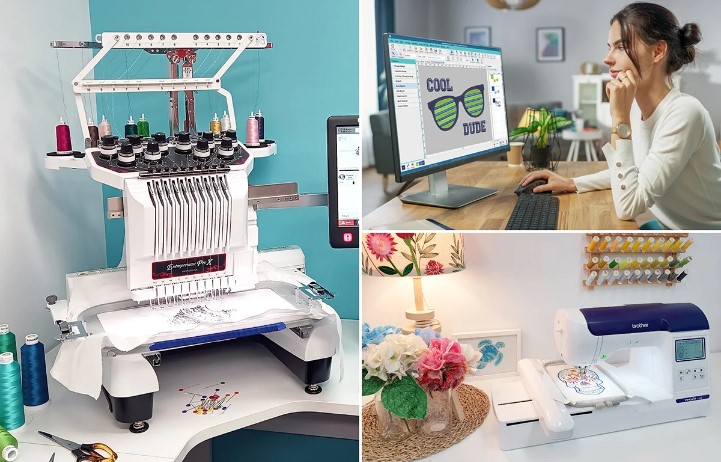
Artwork like JPG, PNG, or AI files must be digitized before becoming a PXF embroidery file.
Conversion Process Overview
- Analyze the artwork
- Clean and simplify the design
- Manually digitize stitch paths
- Set stitch types and directions
- Adjust underlay and density
- Test the design for performance
This process ensures the final PXF file stitches cleanly on real fabric not just on screen.
Auto Conversion vs Professional Digitizing
Some software tools claim to auto-convert images into embroidery files, including PXF but results vary.
Why Auto Conversion Falls Short
- Poor stitch flow
- Incorrect densities
- Messy stitch directions
- Increased machine downtime
Professional digitizing ensures the PXF file is production-ready and optimized for your machine.
Common Mistakes with PXF Files
Even powerful formats can cause problems if not used correctly.
Mistakes to Avoid
- Overloading stitch density
- Ignoring underlay settings
- Using low-quality artwork
- Not testing before production
- Converting without fabric consideration
These issues often lead to wasted materials and lost time.
Who Should Use the PXF File Format?
The PXF file format is ideal for:
- Commercial embroidery businesses
- Apparel manufacturers
- Custom patch makers
- Branding and promotional companies
- BAI embroidery machine users
If embroidery quality impacts your reputation, PXF files are worth using.
Is PXF Better Than All Other Formats?
Not necessarily it depends on your needs.
When PXF Is the Best Choice
- Complex designs
- Frequent edits
- Commercial production
- BAI machine compatibility
When Other Formats May Work
- Simple designs
- One-time projects
- Home embroidery machines
Choosing the right format ensures smoother production and better results.
The Long-Term Value of Using PXF Files
While PXF files may take more effort to create, they pay off in the long run.
Long-Term Benefits
- Fewer machine errors
- Consistent stitch quality
- Reduced production costs
- Reusable and editable designs
For embroidery professionals, this translates into better efficiency and happier customers.
Final Thoughts
Understanding the PXF File Format helps you make smarter decisions about embroidery quality, machine compatibility, and production efficiency. It’s not just another file type, it’s a powerful tool that ensures your designs stitch exactly the way they’re meant to.
Whether you’re converting logos, patches, or detailed artwork, using properly digitized PXF files can dramatically improve your embroidery results. And when accuracy, reliability, and professional quality matter, working with experienced digitizers like Digitizing Buddy ensures your PXF files are created right the first time.